Learners of English Are Welcome Here!

Tag: English

Navigating the Keyboard in English: Part 3

Beneath the “Function Keys,” which are in orange in the diagram below, you’ll see a (blue) row with a number on the bottom and a symbol on the top. You might recognize these symbols but not know their English names.

What is the correct English word for each of these symbols?
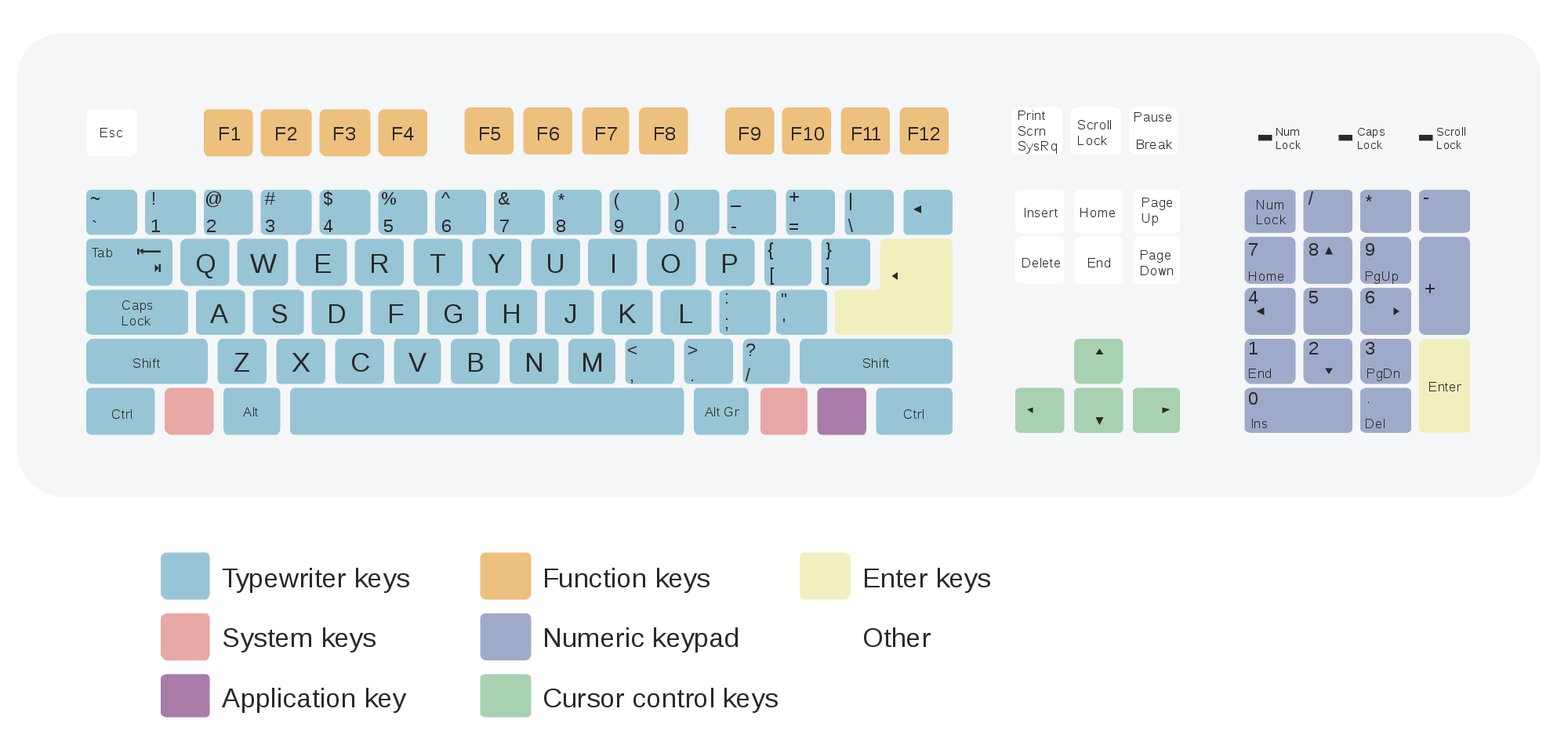
1: Above the numeral ONE (1) is an exclamation mark. ! This is a punctuation mark.

2: Above the numeral TWO (2) is the “at” sign. @ You’ll see this sign in supermarkets: Two lbs (pounds) @ $1.50/each.

3. Above the numeral THREE (3) is the “pound” or the “hash” sign. # You’ll see this sign on telephones.

4. Above the numeral FOUR (4) is the dollar sign. $

5. Above the numeral FIVE (5) is the percent sign. %

6. Above the numeral SIX (6) is the carat. ^ This sign is used in proof-reading.

7. Above the numeral SEVEN (7) is the ampersand. & This commonly means “and.”

8. Above the numeral EIGHT (8) is the asterisk. * This commonly means “and.”

9. Above the numeral NINE (9) is the open parens. (

10. Above the numeral TEN (109) is the close parens. ) Together, the open parens and the close parens are callled “parentheses.” (You might have a comment in parenthesis, like this.)

The last two keys on the top of the numeric line are the underscore _ and the plus sign. The underscore is commonly used in the names of work or computer files: names.on.the.keyboard_English.class.doc.

Of course you know that to type either the underscore key or the plus sign, you must simultaneously* hit the SHIFT key and the symbol key.
*Simultaneously means at the same time.

Now I’ll list this lesson’s vocabulary. See if you can pronounce and point to each one on your keyboard:

  • ( )

Thank you for visiting us for PART #3 of “Navigating the Computer Keyboard in English!

To return to Part 1, click HERE.

Do you have questions? Please write us!
What Is a Noun? Part One

This lesson is dedicated to anyone who is an immigrant to the United States, to anyone who is a child of an immigrant, and to anybody who is a descendant of an immigrant. That probably includes all of us.

What Is a Noun? Part One

A noun is a word that is the name of a person, a place, a thing, a quality, or even an idea or an action.

There are common nouns and proper nouns. Some common nouns are road, bridge, tunnel, airport, news, and non-disclosure agreement. Other common nouns are campaign, promise, tax, and return. Some proper nouns are the United States of America, the White House, Abraham Lincoln, and Konstantin V. Kilimnik The online persona Guccifer 2.0 is also a proper noun.

A pronoun is a word that represents or substitutes for a noun. Some common pronouns are I, him, everybody and nobody.

For Starters: Beneath each noun below write N and beneath each pronoun write P. (Noun phrases are italicized.)
I met her at a very big party in New York. And she was there along with other supermodels, and I greeted all of them, and I said: “That’s the one that’s the most beautiful.” Donald Trump

Name some other common common and proper nouns!!

Vocabulary: Navigating the Computer Keyboard in English

Are you having trouble expressing your computer-literate self in English?

One summer my husband and I traveled to Spain and found our hotel internet to be down.  So we went to some of the public internet sites that abound.  I had so much difficulty knowing how to navigate my way around the keyboard. The language on the keys was different.  Even the keyboard was different from the American keyboard: keys were in different places than I was accustomed to!

So let’s take a look at the English language keyboard used here in the United States and let’s learn what everything is.  We’ll begin with the left side of the keyboard.


The top left key that says “Esc” is for “ESCAPE“. You use this key to escape from any bad situations. Be careful, because this might close any programs that you have running. We use this word “escape” as a noun (he planned his escape), as an adjective (the escape route), and as a verb (he escaped).

On the left, you have the “Tab” key. The “tab” key moves a certain number of predetermined spaces to the right each time you hit, or click, it. We use this as a verb (to tab over to a certain point).

Beneath that, you have the “Caps Lock” key. “Caps” stands for “capitals” and it locks the capital letters into place.

Beneath that, you have the “Shift” key.  Pressing this alternates your letters between small letters and capital letters (small letters and “caps”) and alternates the number row between the numerals and the symbols (such as the numeral 2 and the symbol @, or the numeral 8 and the symbol *). “Shift” is also a verb: You shift between capital letters and small letters.

Beneath the “Shift” key you have the “Control” key. You use the Control key together with another key to perform some function that you desire. For example, if you select some text or an image, then press the Control key and the “C” key together, you will COPY the text you have selected onto your notepad, which you can then paste onto something else.

Below is a review of the vocabulary used in this blog post:

Now I’ll list our vocabulary:

(to be) down
(to) escape
(to) close a program
(to) run/(to) have running
(to) tab/(to) tab over to…
(to) lock
caps/capital letters
(to) shift
(to) alternate

So that’s PART 1 of today’s lesson, Navigating the Computer Keyboard in English!

For PART 2, please click HERE.

© 2009-2026 Software for Students All Rights Reserved -- Copyright notice by Blog Copyright