What Are Those Funny Symbols Above the Number Keys?
Beneath the “Function Keys,” which are in orange in the diagram below, you’ll see a (blue) row with a number on the bottom and a symbol on the top. You might recognize these symbols but not know their English names.
What is the correct English word for each of these symbols?
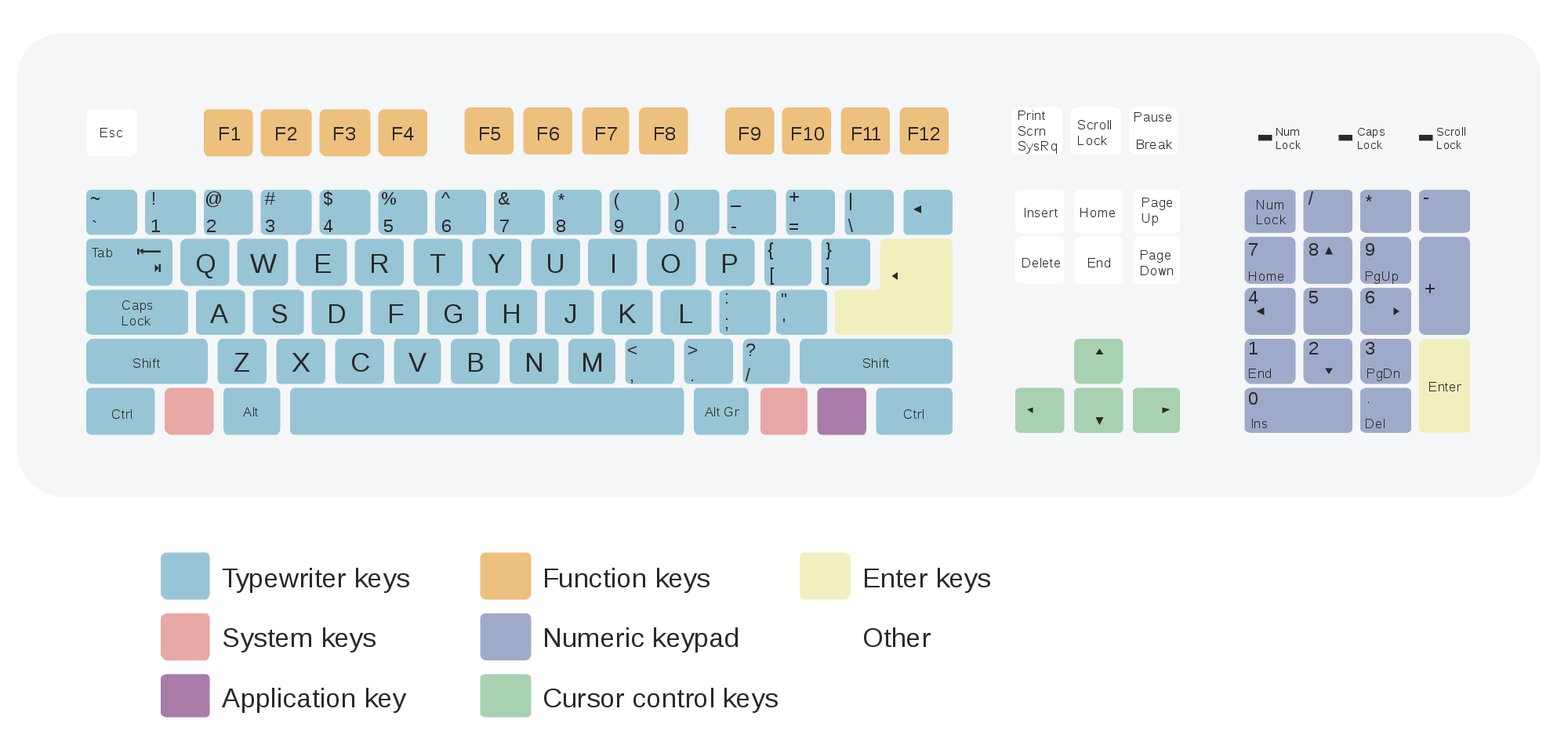
1: Above the numeral ONE (1) is an exclamation mark. ! This is a punctuation mark.
2: Above the numeral TWO (2) is the “at” sign. @ You’ll see this sign in supermarkets: Two lbs (pounds) @ $1.50/each.
3. Above the numeral THREE (3) is the “pound” or the “hash” sign. # You’ll see this sign on telephones.
4. Above the numeral FOUR (4) is the dollar sign. $
5. Above the numeral FIVE (5) is the percent sign. %
6. Above the numeral SIX (6) is the carat. ^ This sign is used in proof-reading.
7. Above the numeral SEVEN (7) is the ampersand. & This commonly means “and.”
8. Above the numeral EIGHT (8) is the asterisk. * This commonly means “and.”
9. Above the numeral NINE (9) is the open parens. (
10. Above the numeral TEN (109) is the close parens. ) Together, the open parens and the close parens are callled “parentheses.” (You might have a comment in parenthesis, like this.)
The last two keys on the top of the numeric line are the underscore _ and the plus sign. The underscore is commonly used in the names of work or computer files: names.on.the.keyboard_English.class.doc.
Of course you know that to type either the underscore key or the plus sign, you must simultaneously* hit the SHIFT key and the symbol key.
*Simultaneously means at the same time.
Now I’ll list this lesson’s vocabulary. See if you can pronounce and point to each one on your keyboard:
- function keys
- numeral
- exclamation mark
- “at” sign
- hash mark
- number sign
- dollar sign
- percentage or percent sign
- carat
- ampersand
- asterisk
- open parens
- close parens
- underscore
- plus sign
Now here’s a little skill test for you. What is each of the following symbols or groups of symbols called?
- )
- ^
- #
- $
- &
- (
- !
- %
- @
- ( )
Thank you for visiting us for PART #3 of “Navigating the Computer Keyboard in English!
To return to Part 1, click HERE.
Do you have questions? Please write us!
